Android Client
apps/android — native Kotlin + Jetpack Compose, three Gradle modules. It
talks to the same backend as the desktop and web clients: no Android-only
API exists on any service. Where the client needs a reference
implementation to match, that's apps/desktop/src/... and the shared
contract in packages/shared-types.
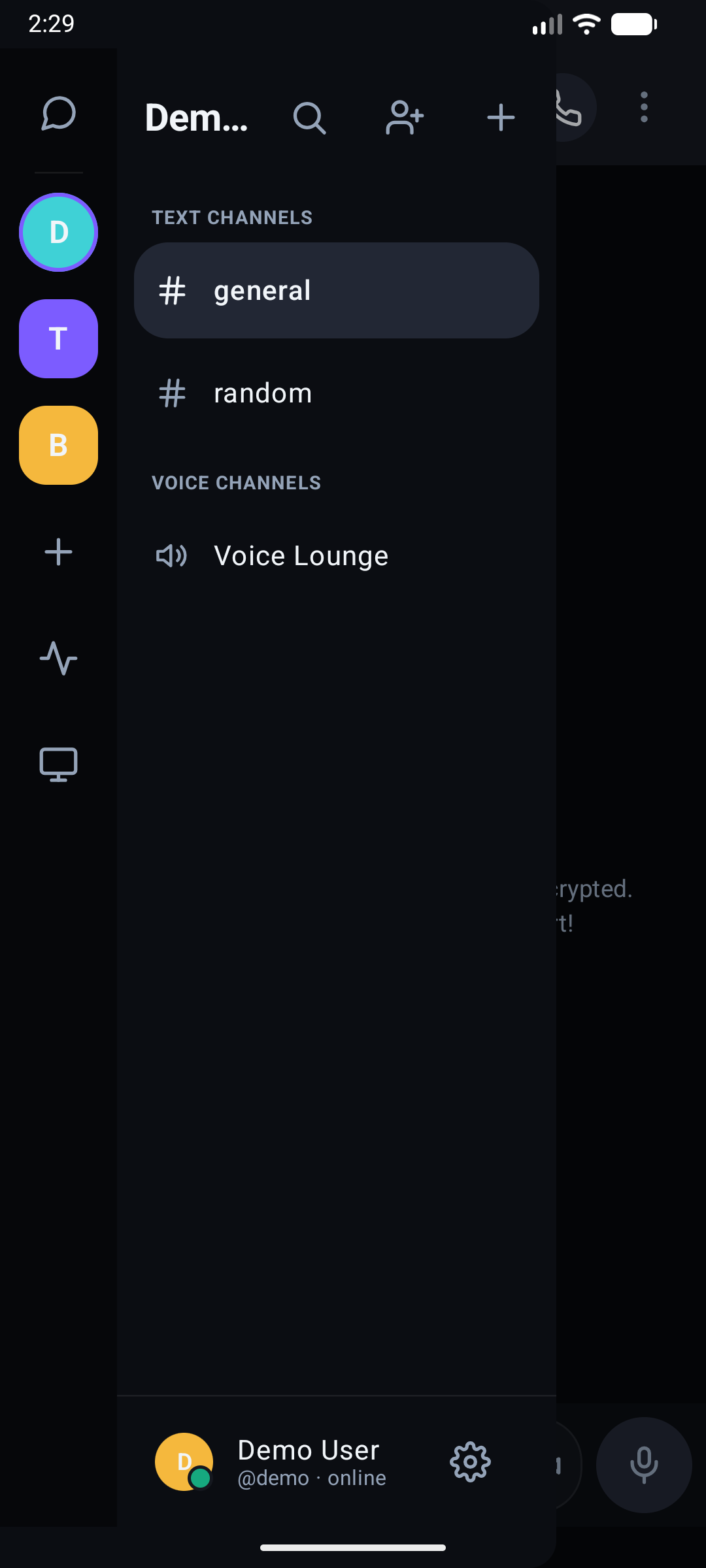
Mobile Interface Gallery
Real UI captures from the BetweenUs Android application running on Android 15 (API 35):
Server & Channel Rail
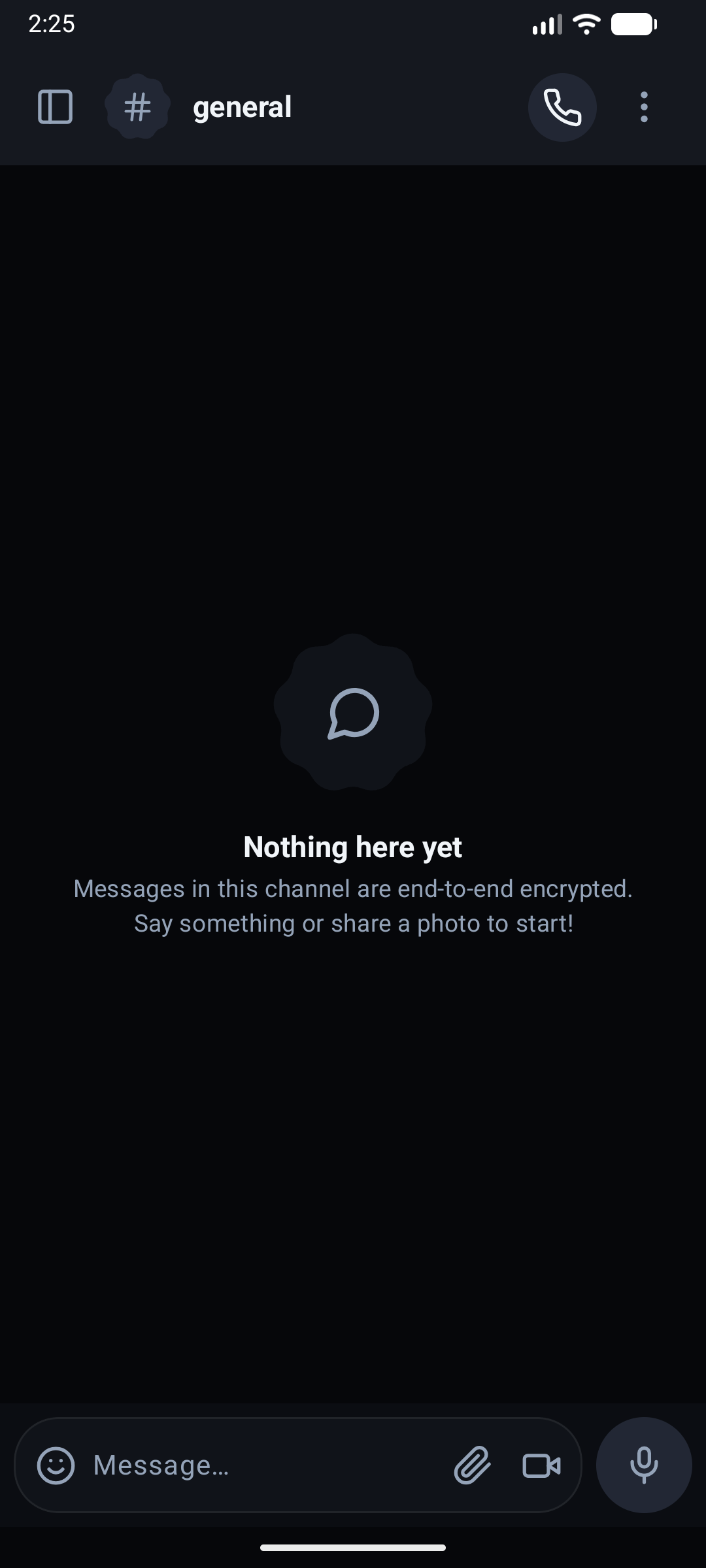
E2EE Chat & Composer
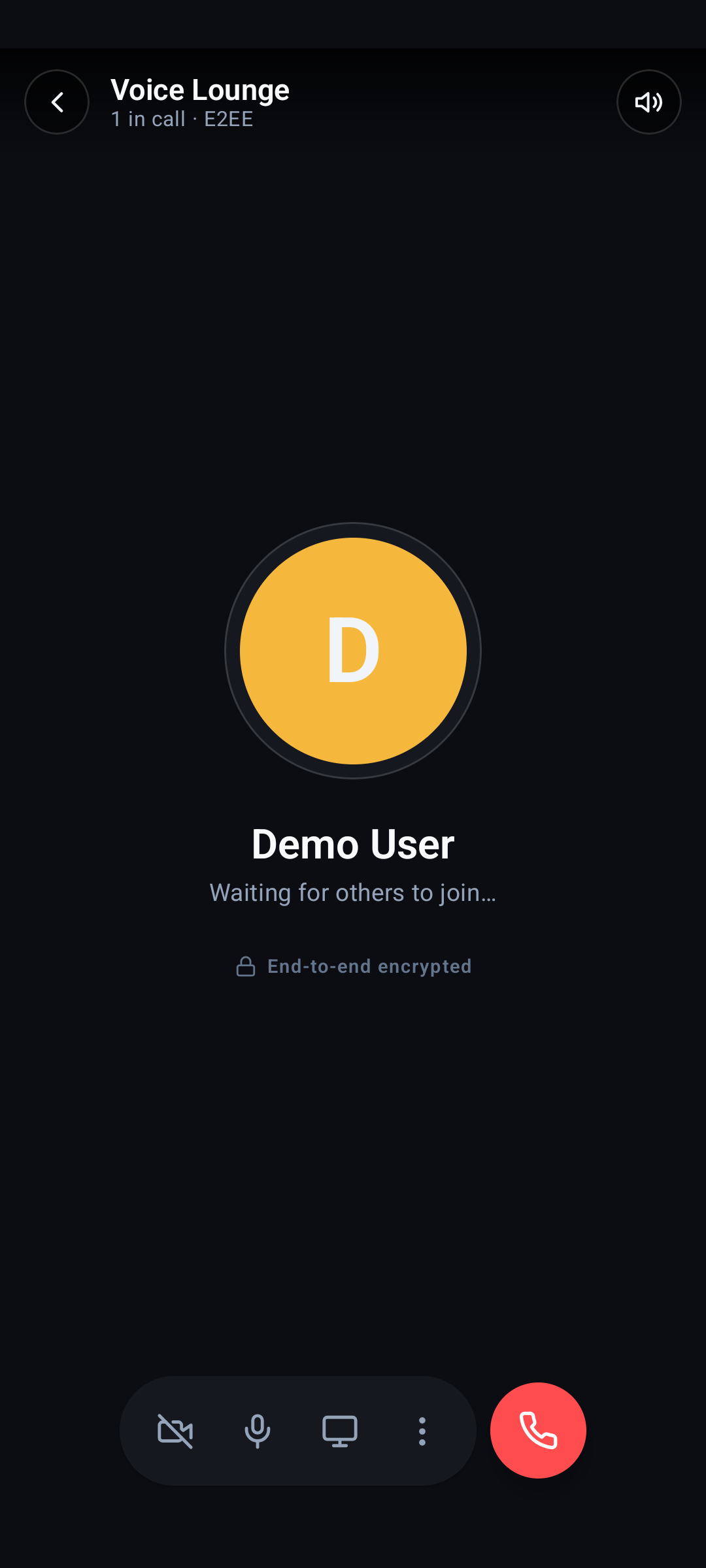
Voice Lounge & Call Stage
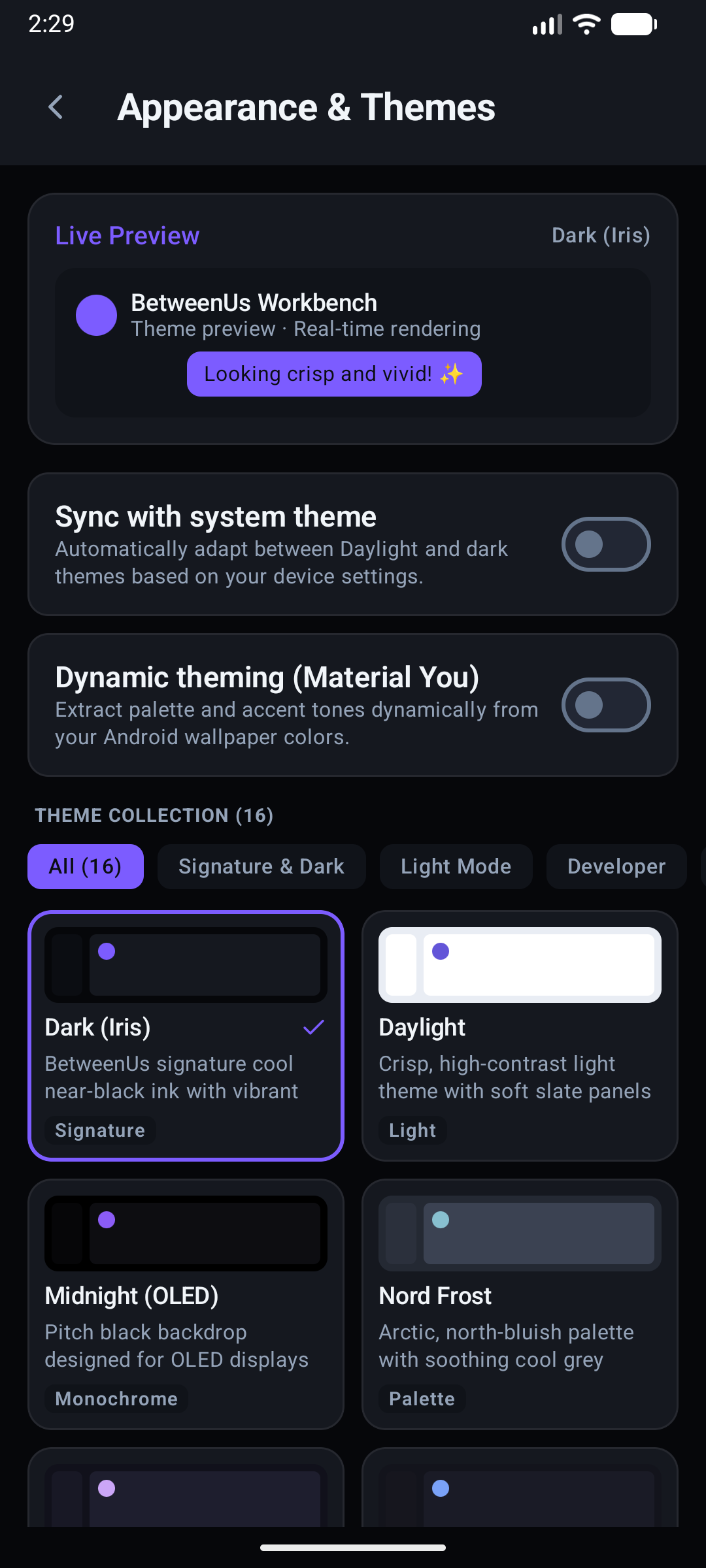
Appearance & Themes
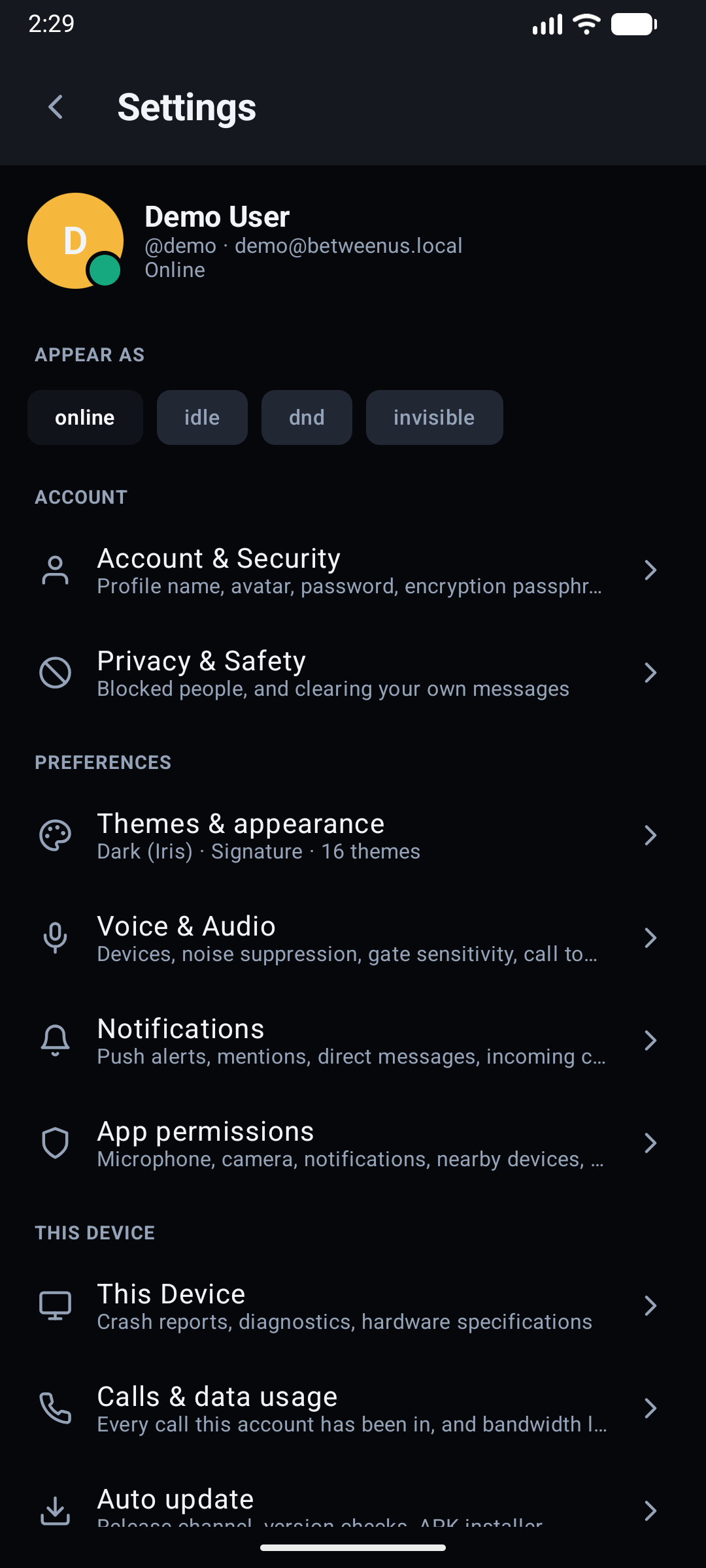
Settings Hub & Account
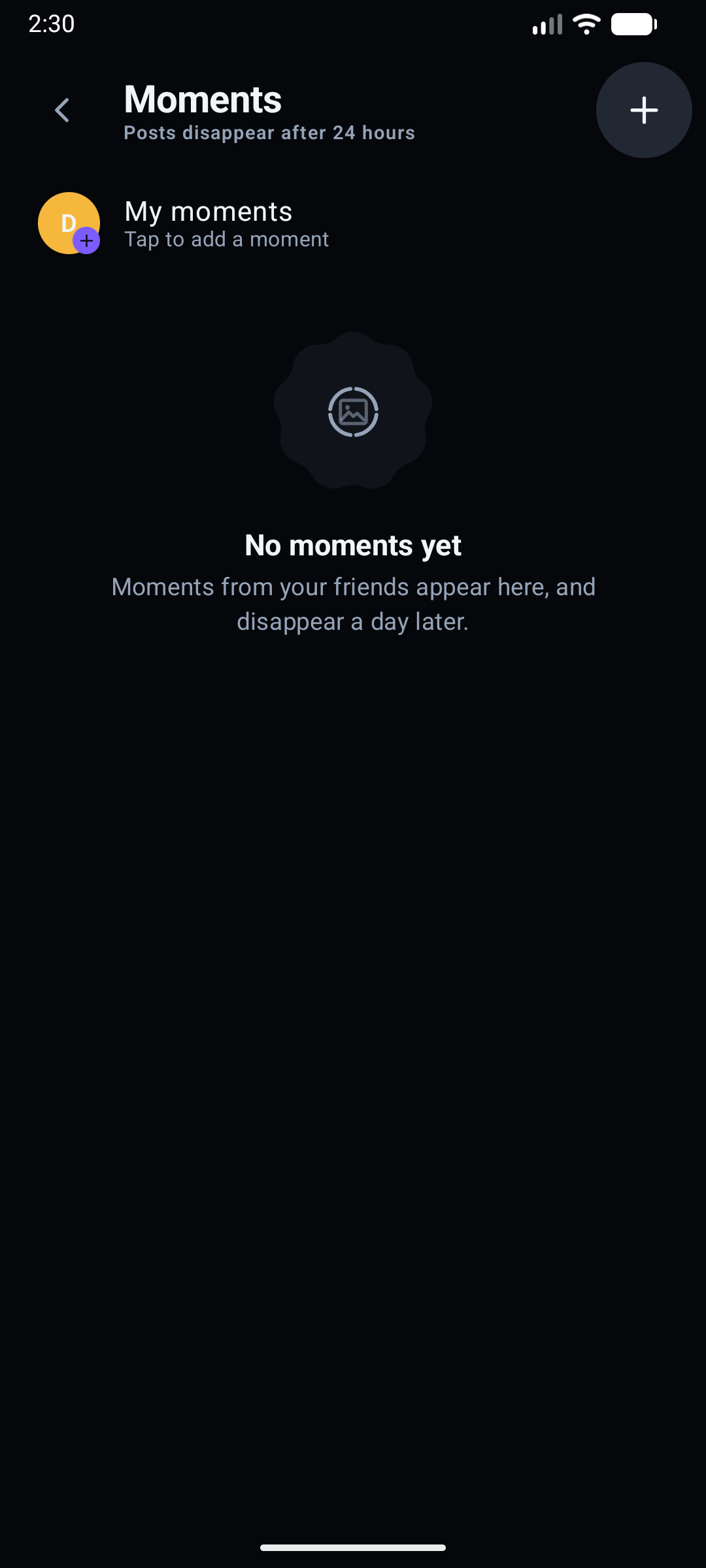
24-Hour Moments Tray
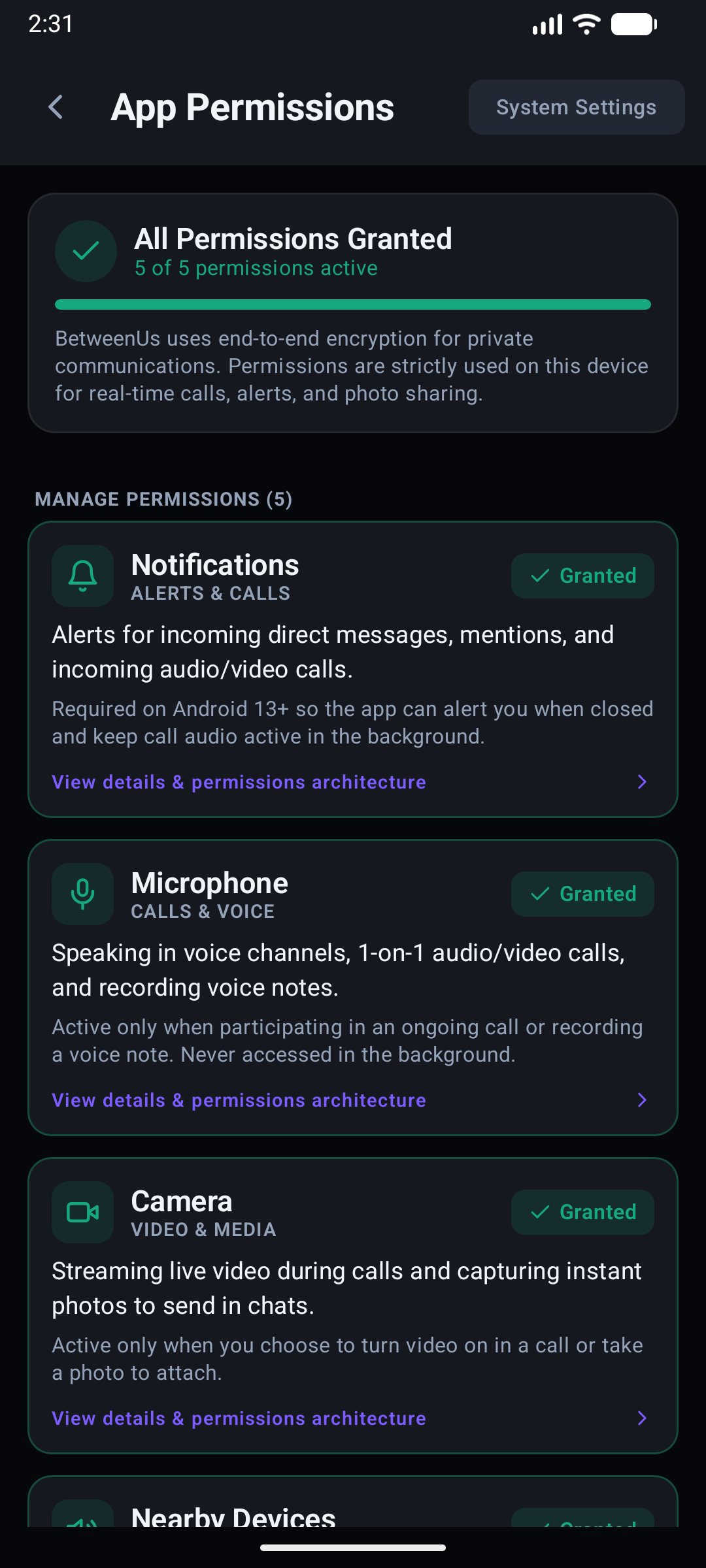
Permission Dashboard
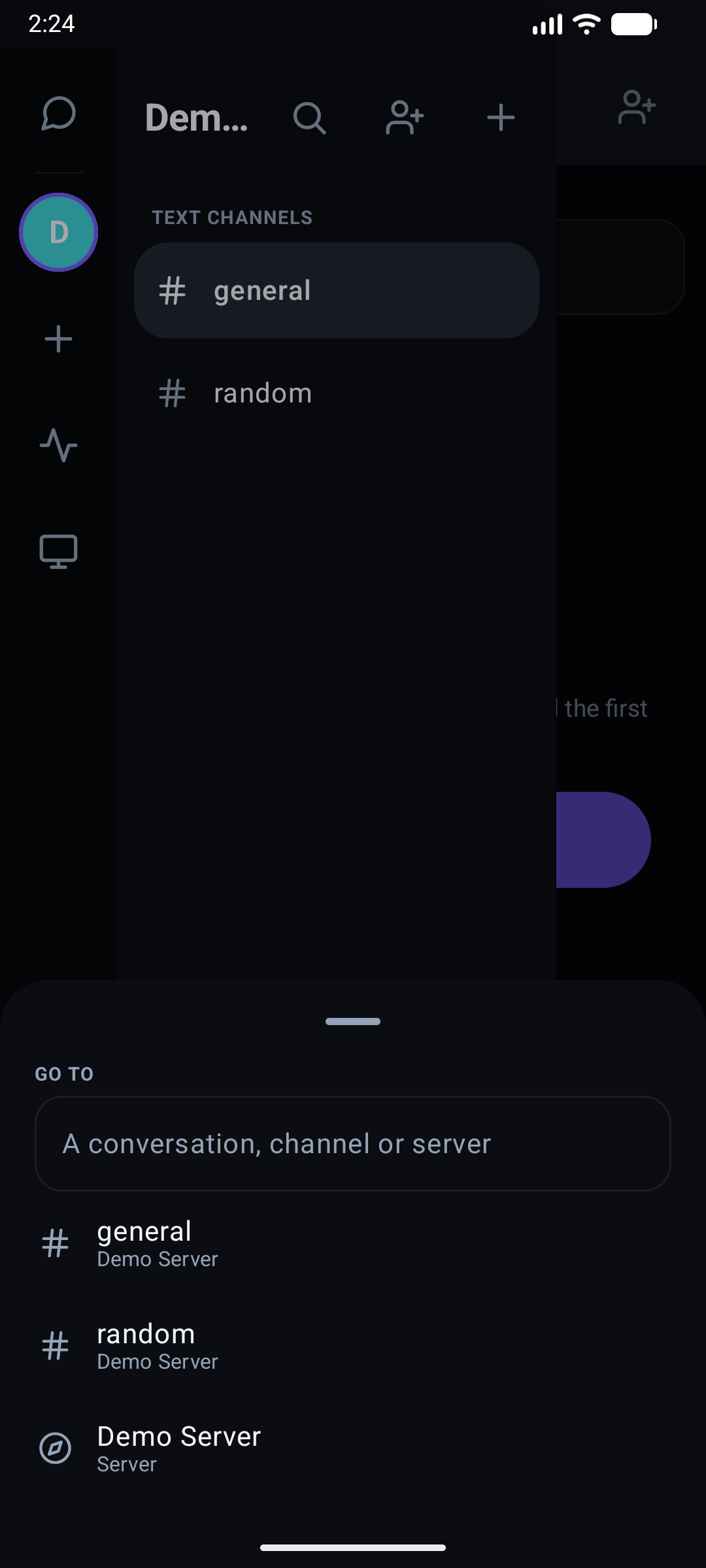
Quick Switcher Modal
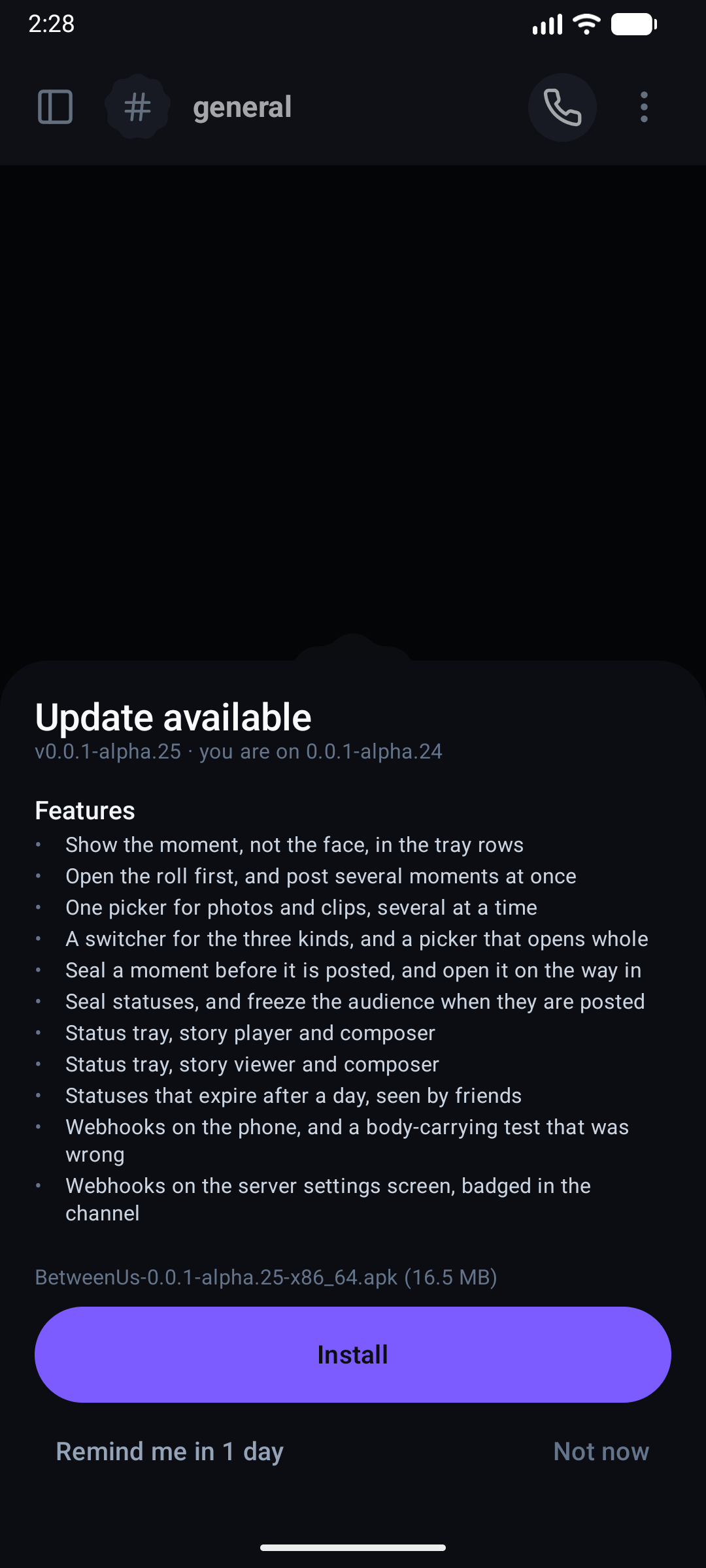
APK Self-Updater
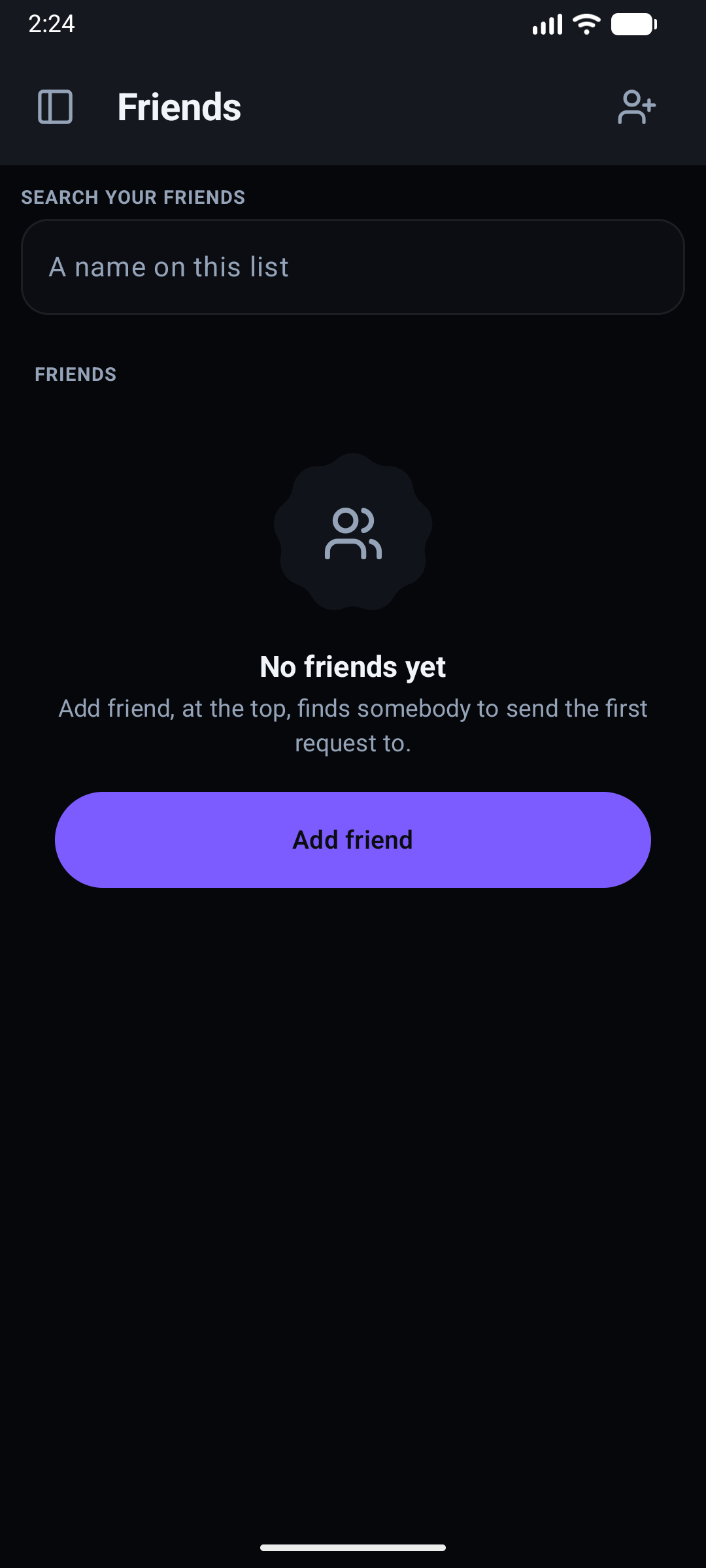
Friends & Direct Messages
Status
In progress, not yet shipping to real users the way desktop is. Register,
sign in, session restore, server switching, channels, messages, reactions
and voice have been run by hand on an emulator against a local backend, and
end-to-end encryption was cross-checked against the desktop client's own
crypto (same epoch, a re-key, still readable both directions). Media —
calls, screen share and the remote-desktop viewer — has since been driven
two-device, which is what a mesh needs to prove anything, along with push
notifications on a real phone, the local cache offline, and the APK
self-updater. Blocking, clearing your own history, password recovery and the
live username check landed since and compile and unit-test green, but have not
been on a device yet. So have statuses - the tray, the story player and the
composer - which compile and unit-test green and have not been watched on a
handset. So has the adaptive shell — two panes on tablets and
unfolded foldables — which has not been on one of those either. Full status, phase by phase:
development/TODO.md.
Modules
core
core/src/main/java/.../core/
  crypto/    ECDH device identity, channel-key wrap/unwrap, envelope codec
  data/       Repositories, DTOs matching packages/shared-types
  store/       Room database — servers, channels, DMs, messages, unread counts
The client opens on what it already knows: servers, channels, the DM list, friends, unread counts and message history come off the local Room database before anything is asked of the server — the same "show cache, then reconcile" shape a modern chat client needs to feel instant on a cold start over a slow connection.
app — features
feature/auth       feature/chat        feature/home        feature/members
feature/servers      feature/settings     feature/shell        feature/notifications
feature/remote          feature/status        feature/update        feature/voice
-
status— Moments: posts that expire after 24 hours, sealed for the friends the author had when they posted (E2ee.sealStatus). The tray is a route (Route.Status, reached from the rail — beside it, aPhoneicon reachesRoute.CallUsagedirectly, so Calls & Data is a rail destination rather than a page nested inside Settings), and the player and the composer are full-screen dialogs mounted at the root besideProfileDialogHost, so a ring in a list, a row in the tray and an avatar in a conversation all open the same one.core/store/Statuses.ktholds the feed and is started and stopped with the session, likeWorkspace. The segmented ring lives insideAvatarinui-common, which is why every list grew one at the same moment.Posting hands the work to
Statuses.postInBackground, which runs on the store's own scope: the composer closes on the tap, the tray fills in as each post lands, and an upload survives the screen that started it. A picture goes throughPhotos.asJpegbefore it is sealed - a phone camera writes HEIC and no browser engine decodes one, so an unconverted moment reached the desktop as a broken image.MyMomentsHostis where the composer lands on the way out: one tile per post with its own view count, and the picker instead when there is nothing posted yet. Its grid reads newest first while the player behind it plays oldest to newest, so each tile carries the position it opens rather than either order being bent to fit the other. The desktop'sMyMoments.tsxis the same screen. In the player the progress bar waits for the media to finish downloading, and a drag up opens the viewer list.That gate is per-post on this client (
elapsedis remembered by post id), so it does not have the bug the desktop had: there, every bar in a run took its start time at mount, and pausing one that had never run charged it for the time the earlier posts were up - seeclock.tsand its check.Answering a moment - a reaction or a reply, which are the same message with different text - goes through
Conversation.answerMoment: it opens the DM with the author and sendsmomentRefinside the sealed body.MomentQuotedraws it back in the conversation, with the post's own picture while it is alive and "no longer available" once it has expired. A reaction also lands on the post itself (Statuses.react), whose tally the author reads off their own pill;PrivacyScreenis where the audience for the next post is chosen. -
remote— a remote-desktop viewer only. The phone can watch and control an enrolled machine; it can't itself be enrolled as a target, since nothing on a phone can move a desktop's mouse. Same asymmetry as the web client (see Architecture Overview). -
settings— modular Settings Hub (Route.Settings) structured hierarchically into dedicated sub-setting pages:AccountSecurityScreen(Route.AccountSettings) — Profile, display name, avatar customization, password management, and E2EE key/passphrase backup.VoiceSettingsScreen(Route.VoiceSettings) — Audio routing, input device, HiFi microphone mode, three-level noise suppression, echo cancellation, automatic gain control, and pre-gate sensitivity dBFS meter.NotificationSettingsScreen(Route.NotificationSettings) — Push preferences and OS notification integration.DeviceSettingsScreen(Route.DeviceSettings) — "This Device" diagnostics, local crash reports, call data history, and auto-updates.PermissionsScreen(Route.Permissions) — Consolidated runtime permissions overview with live health meters and batch grant actions.PermissionDetailScreen(Route.PermissionDetail) — Dedicated per-permission deep-dive pages (Notifications, Mic, Camera, Nearby Devices, Media) with hardware operations, rationales, and live toggles.PrivacyScreen(Route.Privacy) — Blocked users directory and message history clearing.ThemesScreen(Route.Themes) — 16 curated themes, Material You dynamic wallpaper theming, and accent customization.
-
chat— the conversation. A direct message's header carries the other person'sAvatar, not an anonymous outline in a cookie: the drawer row that opened the conversation is showing their photo, and a header drawing a glyph beside it read as a different person. Tapping any avatar that stands for a person opens their photo throughProfileViewer— see Profile photos. -
home— the friends list, andAddFriendScreen(Route.AddFriend) beside it. Two searches, deliberately kept apart, matching the desktop's Add friend tab: the field on the friends list filters the people you already have, and the separate screen searches the directory and drops anyone already on the list from its results. Opening a direct message from either is the only way one gets created, on every client. -
members— who is in the server, and what a row offers. Message is allowed to be refused — a server puts people in the same room, it does not make them friends, soPOST /api/v1/dmanswersFRIENDSHIP_NOT_FOUNDorNOT_FRIENDSand the screen says so rather than throwing out of a coroutine. Everything past Message and More lives inMemberMenuSheet, including the role editor: a row is a name first, and a name measured after four trailing buttons is an ellipsis. -
update— checks the app's own GitHub releases on launch (channel: alpha/beta/stable), downloads the APK built for the device's real ABI rather than the universal one, and hands it to Android's installer. -
voice— the same WebRTC mesh described in Peer-to-Peer Media, Android's ownRTCPeerConnectionbindings instead of the browser's.
Which day a message was sent
A bubble carries a clock time and nothing else, so a conversation read a month later says 09:14 without saying which morning. The list puts a day divider above the first message of each day - Today, Yesterday, the weekday for the week just gone, and the full date once a week has passed and a weekday would name two different days. The days are the reader's local days, so a message sent at 00:30 sits under today's divider even where the server called it yesterday.
Clock times follow the device, not the locale: Android has a Use 24-hour
format switch, and a chat showing 14:32 to somebody whose phone says
2:32 PM everywhere else is the one thing on screen out of step with it.
clockTime reads DateFormat.is24HourFormat and moves only the hour field of
the locale's own short-time pattern, so the separator and the order stay the
locale's. The desktop and web get the same answer from Intl for free.
"Today" is the server's today, not the phone's. ServerClock learns the
offset from the Date header every HTTP reply already carries, and a phone more
than five minutes out gets a banner saying so. It is a display rule, not a
security one: every expiry in the product is decided on the server, and a phone
clock cannot move any of them — see Security.
Timezones need no handling beyond that, and that is deliberate: every timestamp
on the wire is UTC (toISOString() on the services' side, createdAt never
minted by a client), and every client reads it in the reader's own zone. A
message sent at 20:00 in Berlin reads 23:30 to somebody in Kolkata, under that
reader's day divider. Nothing is ever drawn in the sender's zone or in UTC.
The rule is dayLabel/sameDay/clockTime, written twice and tested on both
sides:
Day.kt here, day.ts on desktop and web, the same cases in each. The
"message info" sheet's read receipts use the same words and the same clock, so a
receipt never names the day differently from the conversation above it. A day
boundary also breaks the author grouping - two messages a minute apart either
side of midnight have a divider between them, and a run of bubbles reading
across it visibly is not one run. The desktop's message search labels its
results the same way rather than printing a bare date.
Searching a conversation
ChannelSearch.kt — a sheet from the channel overflow menu, where the desktop
has a right-hand panel. A phone has one column, so a panel there would be the
whole screen anyway.
It searches the history this process has already decrypted, and it has to:
content on the wire is an envelope, so the server cannot match a word in one
without being handed the channel key, which is the thing the design will not do.
The reach is therefore whatever has been paged in, and the footer says so with
the count in it — a search that quietly stops at a fortnight ago is worse than
one that says where it stopped, because only the second can be widened on
purpose by scrolling further back.
The rules are the desktop's SearchPanel, and ChannelSearchTest pins the four
that fail silently rather than loudly: a two-character floor, deleted rows
skipped, the newest hundred matches first, and a snippet taken from around the
term instead of from the front of the body. Every one of those still returns
results when it is wrong.
Opening a result reuses the quoted-message jump already in ChatScreen — scroll
to the row, then flash it. A row that is only scrolled to is a row nobody can
pick out, because the list moved underneath them to get there.
Driving somebody's shared screen
feature/voice/ShareControl.kt — the viewer half of the desktop's
shareControl.ts, and only that half. A phone can ask for the mouse on a screen
somebody is sharing in a call and then use it; it cannot be driven itself,
because being driven means injecting synthetic mouse and keyboard events and
Android has no such thing outside an accessibility service — a permission this
app has no business asking for.
The asymmetry is answered rather than ignored: an ask arriving at a phone is
met with a deny carrying a reason, so somebody on a desktop learns why not
instead of waiting on a dialog that will never appear. Input aimed at a phone is
dropped, which is the whole of the correct behaviour when there is nothing to
inject it into.
No server is involved. The exchange rides the peers' own data channels, which
have exactly two ends, and the only authority is the person sharing pressing
yes — the right authority, since it is their machine and they are sitting at it.
Who a message came from is decided by which connection carried it, never by
anything inside it, and a grant is honoured only from the peer that was
actually asked.
Driving is offered only while the share is pinned. That is correctness, not layout: pinned, the tile is exactly the stage box, so a touch maps to a fraction of the picture with nothing to guess. In a grid it is one tile among several and the arithmetic would be a guess about somebody else's mouse. The bar says so and offers the pin rather than leaving a surface that does the wrong thing.
The surface is absolute rather than a trackpad, because a phone driving a desktop is somebody pointing at a thing they can see. A cancelled gesture still sends the release: a press never lifted is a mouse held down on somebody else's machine.
A chair at Play Together
core/store/Play.kt, feature/voice/GameBoards.kt and
feature/voice/PlayStage.kt. call-service is the referee: a client sends
"column four" and gets a board back, and a board is never sent the other way —
a client that could send twenty coin positions could send twenty coins in the
pockets. So the phone's job is small by design: draw what arrived, send taps.
No game rules are implemented here.
packages/shared-types/src/games/ is the only implementation in the repository,
and a Kotlin copy would be a second one to disagree with it — the first
disagreement being two people looking at different games. That decides which
games a phone plays: the ones whose legality can be read off the board.
| Game | On a phone | Why |
|---|---|---|
| Tic-tac-toe | Played | A legal move is an empty square |
| Connect Four | Played | A legal move is a column with room |
| Dots and Boxes | Played | A legal move is a line not yet drawn |
| Reversi | Watched | Legality is a walk in eight directions from every empty square |
| Ludo | Watched | The board is token positions in GameState.data |
| Carrom | Watched | The board is twenty coins at floating-point positions |
Watching is not a consolation. The board, the chairs, whose turn it is and the score arrive for all six, so a phone in the call sees the whole table; what it declines to do is offer a tap it cannot honestly call a move, and the stage says so rather than leaving a board that does not respond. The library button starts any of the six, including the three this phone can only watch — a person on a phone in a call with two desktops is a reasonable person to start a game of Carrom.
Each board is one Canvas rather than a composable per cell: Reversi is
sixty-four cells and Dots and Boxes is forty lines plus sixteen squares plus
twenty-five dots, and a composable each is a recomposition each on every move.
Taps are accepted only when it is genuinely this person's turn — a board that
takes them out of turn sends moves the referee refuses, which reads as a board
that ignores you.
A seat at Listen Together
core/store/Listen.kt and feature/voice/ListenStage.kt. The phone holds the
session the gateway sends — the queue, which track, whether it is paused, and
where the needle was — and draws it above the call's control dock, with pause,
skip and remove. Those are requests to the gateway, never local changes: it is
the only thing that can order two people pressing skip at the same instant, for
the same reason it arbitrates the screen share.
listenPositionAt exists twice, here and in packages/shared-types, and has to
agree to the millisecond. It is the entire meaning of the
positionMs/atServerMs pair: the gateway sends where the track was, and
each client advances it off a clock they share — which is what stops a progress
bar needing a message a second to move. The cases that separate two plausible
implementations are the tested ones: a paused track does not advance however
long ago the state was made, a clock reading earlier than the stamp does not run
the track backwards, a known duration clamps, and an unknown duration (0,
which is what every track carries until some player reports one) must not —
reading it as a length is a track that is over before it starts.
Any state carrying a revision the client has already seen is dropped, so a client's own echo cannot undo somebody else's later change. A null session is the exception and always applies: "nothing is playing" carries no revision, and refusing it would leave a dead track on screen for ever.
The phone plays the audio too. YouTubeFrame.kt is a WebView running
YouTube's own IFrame API — the same player the desktop drives, and the only way
to play a YouTube video that is neither against their terms nor a scraper that
breaks every few months. No audio crosses the call: the gateway holds a queue
and a position, and each client streams the video itself, which is what lets any
of this exist with no media server.
ListenSync.kt is the desktop's listen-sync.ts with its numbers intact, since
two clients correcting on different tolerances are two clients that disagree
about whether they are in step. A second and a half of drift is left alone;
past it the player is pulled back in one jump, to where the call is at the
moment of the decision rather than where it was when the drift was measured — a
seek is not instant and the track keeps moving while it happens. A paused
session gets a quarter second instead, because nothing is moving and two people
staring at a stopped track that reads different numbers is the most obviously
broken this can look.
Three things about the embed were not optional:
mediaPlaybackRequiresUserGesture = false, or every track waits for each person to tap the video — which in a synchronised session means everybody starting out of step by however long their taps took.playsinline=1, or Android hands the video to the system's full-screen player: a second surface this app cannot pause, seek or duck.- A real base URL, because the IFrame API checks the origin it was loaded from and refuses a document that has none.
The phone now also fills in what a track is called. Nothing on the server may ask YouTube — that would be a backend service with an API key, an egress rule and an opinion about who is listening to what — so the first client whose player loads the video tells the session, and a session of nothing but phones is no longer a queue of eleven-character ids.
Ducking is the embed's own volume, not the phone's media stream: turning the stream down would duck every other sound on the device, and the call itself is on the voice stream and must not move at all.
Push to talk, with a thumb
PushToTalk.kt. The gate answers "is somebody making a noise"; this answers
"do you mean to be heard", and no threshold gets there — a bus, a television and
somebody else's conversation are all above any level that still passes a quiet
voice. The desktop holds a key and listens on the window. A phone has no key, so
the control is held with a thumb on the call toolbar, and the setting that turns
the mode on lives beside the gate in voice settings.
Four inputs decide whether the microphone passes audio, and they are four different questions, so they live in one tested function rather than spread through the engine:
| Input | Question | Rank |
|---|---|---|
muted | Is this client in the call at all? | Outranks the control |
held | Did the system take the audio (a real phone call)? | Outranks everything |
pushToTalk | Is the mode on? | Decides whether the fourth is read |
talking | Is the control down? | Only in that mode |
What the far end is told is the capture, not the button. A push-to-talk client
between sentences is sending nothing, and a tile drawn live is a tile somebody
waits on — so publishMediaState asks the same function. Publishing the button
alone makes such a participant look permanently live while silent, which reads
as a broken microphone rather than as a released key.
Two ways it could stick open, both closed deliberately. The call screen going away while the control is held is this platform's version of the desktop losing window focus — the release never arrives — so leaving the screen closes it. And turning the mode on during a live call re-decides immediately, because otherwise the microphone stays open until something else happens to ask, and somebody who has just switched to push to talk is live without knowing it.
Getting anywhere from anywhere
QuickSwitcher.kt — one field over conversations, channels and servers, opened
from the search control in the drawer header. The desktop opens the same thing
on Ctrl+K; a phone has no Ctrl and no K, and the drawer is where somebody who
does not know where a thing is has already gone looking.
It offers every server's channels, where the desktop offers only the open
server's. That is a difference in what each client has already loaded rather
than a difference of opinion: the desktop fetches a server's channels when that
server is opened, while Workspace.refresh fetches them all up front because
the socket has to be subscribed to every channel or nothing arrives to badge.
Two channels with the same name are told apart by the hint, which carries the
server's name.
Going to a voice channel does not join it. Tapping one in the drawer does, and should — that tap is about that channel. Picking one out of a list of everywhere you could go is not consent to open a microphone.
The sheet is drawn at the shell level, outside both layout branches, so the
phone and the unfolded foldable share one copy. What picking a server means, and
that a voice channel must never become "the channel", live in goToServer and
goToChannel on the shell — the drawer and the switcher both route through
them, because a second copy of the voice rule is a second place for it to be
forgotten.
The channel list, and rearranging it
The drawer draws a server the way the desktop sidebar does: the channels in no
category first, as a TEXT CHANNELS list and a VOICE CHANNELS list, each
with its own create button for a manager (the voice one opens the create sheet
already on Voice), and then every category. Inside each list and category text
comes before voice. The sections come from channelSections in Models.kt,
the same order the desktop's buildSections gives.
Folding a category is kept per account and per server on this phone
(store/CollapsedCategories.kt, a small SharedPreferences file) and survives
a restart; sign-out forgets it. It is never sent anywhere. A folded category
still shows its unread count and the channel you are in.
Somebody with MANAGE_CHANNEL long-presses a channel or a category heading for
Move up / Move down, and the same two steps are offered to a screen
reader as custom actions on the row, so moving never depends on a held gesture.
There is no drag. A step inside a section swaps with the neighbour of the same
kind; at the edge of its group a channel crosses into the section above or
below, so it can be carried into and out of a category one step at a time. The
rules are a port of the desktop's sidebar-layout.ts move helpers and of the
shared applyChannelLayout (core/data/ChannelLayout.kt, covered by
ChannelLayoutTest).
A step is drawn at once: Workspace.arrangeChannels applies the layout locally
with the same applyChannelLayout the server runs, then sends
PUT /servers/:id/channel-layout. If the server refuses, the list is put back -
unless a refetch has already replaced it, which is newer than either copy - and
the reason is shown above the list.
Managers also make and maintain categories. The + in the drawer header opens
Create a channel / Create a category; a category heading's long-press
menu (and its screen-reader actions) adds Add text channel, Add voice
channel, Rename category and Delete category after the two moves.
These mirror the desktop endpoints: POST /servers/:id/categories and
PATCH / DELETE /servers/:id/categories/:categoryId (all MANAGE_CHANNEL,
audited server-side), and categoryId on POST /channels. Delete asks first and
says the channels are kept - the server moves them to the uncategorized list.
Workspace.createCategory, renameCategory and deleteCategory re-read the
list afterwards, as does the server.channels.changed event, so positions are
the server's. Names are shown as the server will store them
(normalizeCategoryName, tested in ChannelLayoutTest); a refusal appears in
the sheet or dialog.
Creating a poll
The attachment sheet has a Poll tile (not while files are waiting in the
preview or a message is being edited). PollComposerSheet.kt takes a question,
two to ten options, a multi-choice switch and an optional length (an hour, a
day, three days, a week, or until closed). Polls.ready holds the same word
limits as the desktop's readyPoll - the server never sees the words, so it
cannot check them - and refuses two options that say the same thing.
Conversation.sendPoll seals the question as the message text and the labels
as poll.options inside the envelope, and tells the server only the option
count, multi-choice and duration.
One name, drawn once
Every list of people draws a display name over an @handle. An account that
never set a display name has the two be the same string, and the row then reads
"test" over "@test" — which looks like a rendering fault rather than a name.
UserSummary.handle, ServerMember.handle and PublicUser.handle answer null
when the second line would only repeat the first, so the rule lives in core
once instead of in each of the five screens that draw a person, and
PersonLabelTest holds it — case-insensitively, and for a blank display name.
One shell, two shapes
The client used to draw a conversation with the channel list behind a hamburger, on every device. That is right on a phone and wrong on everything else — a tablet or an unfolded foldable has room for both, and hiding one behind a button is throwing the screen away.
shellFrame(width, hingeStart, hingeEnd) in :ui-common decides:
| Window | Shape |
|---|---|
< 600.dp | One pane. The channel list is a ModalNavigationDrawer. |
>= 600.dp | Two panes. The list is permanent beside the conversation and the hamburger is omitted. |
| Vertical separating fold | The split lands on the fold and the seam is left empty. |
| Fold too near an edge | Ignored — a bounded proportional split (280.dp–360.dp) instead. |
It is a pure function, deliberately separated from the four lines of
rememberShellFrame() that read the window and the posture, because every
interesting case is a device nobody testing it will be holding: a foldable
half-opened, a hinge nearer one edge than the other, a folded foldable that is
a narrow phone with a seam behind the screen, a freeform window dragged narrower
while the app runs. Ten of them are asserted in ShellFrameTest.
Three details that are decisions rather than defaults:
- The hamburger goes, rather than being drawn dead. A button that opens a panel already open is a control that appears to do nothing, so the screens that draw one take a nullable callback.
- A horizontal fold is not a hinge here. Laptop posture does not divide the window left from right, so it never reaches the function.
- Both layouts call the same two composables. They are extracted rather than written once per branch — a second copy is a second place to add a callback to, and the one that gets forgotten is always the one on the device nobody is holding.
One dependency does it: androidx.compose.material3.adaptive:adaptive, whose
currentWindowAdaptiveInfo() answers both "how much room is there" and "is
there a hinge across it". MainActivity already declared
screenSize|screenLayout|smallestScreenSize in configChanges, so unfolding
resizes and recomposes instead of recreating the activity.
Not yet done: a third pane for the member list, which a 1280dp tablet has room for and the desktop client already shows.
ui-common
A dynamic Material 3 Expressive Compose design system shared across every feature module, plus Adaptive.kt — the window-size and folding-feature decision described above. Features:
- Dynamic 16-Theme Palette Generation (
BetweenUsColorPalette,LocalBetweenUsColors, andBetweenUsThemeTokens). - Accent Customizer: Dynamic override of active tokens across all Composable surfaces.
- Spring Motion Scheme (
BetweenUsMotion.spatial,BetweenUsMotion.effect) driving predictive push/pop navigation transitions and animated category filtering. - Legacy Compatibility Layer: Seamlessly binds
Ground,Surface*,Accent, andSlate*call sites to dynamic active tokens.
End-to-end encryption on Android
Same design as E2EE: one ECDH P-256 device identity key per installation, sealed refresh token via the Android Keystore, channel keys wrapped per device. Nothing about the crypto is Android-specific except where the private key is sealed.
Sign-in from a phone
OAuth can't come back to a loopback port the way desktop's flow does — a
phone has no listener nothing else can steal. Instead the redirect targets
a private URL scheme (betweenus://oauth), bound to a PKCE-style challenge:
the client sends a SHA-256 of a random verifier when the flow starts and
must produce the verifier itself to redeem the one-time code, so an app
that merely intercepts the scheme (Android doesn't guarantee only one app
can register it) holds a code it can't spend. Detail:
Auth & Permissions and
development/SECURITY.md.
Blocking, clearing, and getting back in
The client speaks the same four account endpoints as desktop and web, and three of them needed something here that the browser did not.
A block is announced as an ordinary removal — the far side is never told
which of the two it was. But the phone builds its conversation rail from a list
rather than deriving it from the friend list, so friends.changed reloads both.
Without that, the blocked conversation stayed in the rail and answered 404 when
tapped, which tells the far side exactly what the design was avoiding.
Workspace also removes the person from both lists at the moment of the call
rather than waiting for that announcement to come back round, because the screen
the button was pressed on has to be right immediately.
The block list is cached and followed. Workspace.blocked is written to the
Room Cache as a blocked row beside the other lists (codec round-trip in
CacheCodecTest), so the privacy screen offline shows who is blocked, and
Cache.clear() / Cache.claim() drop it with the rest on sign-out or a
different account. friends.changed reloads it as well as the friend and
conversation lists, because it is what folds a blocked person's messages in
shared servers: ChatScreen turns each run of theirs into one BlockedRunRow
("Blocked message · Show", revealed for that screen only), and PushService
drops a push from them even if the server has not been redeployed yet. A push
in a cold process checks the list before Workspace.refresh() has hydrated it,
so PushGate.blockedList() falls back to the cached blocked row when the list
in memory is empty (PushGate.blockedOrCached, tested in PushGateTest).
Drafts live in the same Room table. Drafts keeps unsent composer text and
the reply target per conversation in memory first, and writes one drafts row
to Cache after a 500 ms pause. Because it is a row beside the lists,
Cache.clear() and Cache.claim() take it with them; sign-out also calls
Drafts.forget() first so a write still waiting cannot land in the next
account's cache. Unlike everything else in the cache this is plaintext - the
person's own words on their own phone - and it never touches the network.
chats.cleared reaches Room, not only memory. The cache is what makes
opening the app not a spinner, and after a clear it holds envelopes the server
will no longer return — so Conversation drops the database, the decrypted
history and the paging cursors together, then re-opens whatever is on screen.
Clearing only the in-memory copy would have brought the whole thing back on the
next cold start.
The username availability check is debounced and cancelled. A plain debounce still allows a slow answer about an earlier name to land after a faster one about the name now in the field, reporting a free username as taken.
Clear all my messages sits behind a dialog rather than desktop's typed confirmation — on a phone keyboard, a sentence somebody has to read is the better speed bump. The forgot-password screen is the only client that states what a reset costs before it happens: the identity backup is sealed with the old password, so a phone signing in fresh afterwards reads what arrives from then on, not what came before.
Following a thread
A thread is its own screen (ThreadScreen), and the state behind it is Conversation.threads, kept apart from the channel timeline.
- Follow / Unfollow sits in the thread screen's header. It calls
PUT/DELETE /api/v1/messages/:rootId/thread/followand shows the server's word: a thread is followed exactly whenConversation.threadUnreadholds a count for it, and thethread.followsocket event (sent to this account alone) sets or removes that entry, so a follow made on another device flips the button live. - Followed threads is a screen (
FollowedThreadsScreen) opened from the channel menu, from the drawer's header (next to the switcher) and from the Friends header at home; both entries (FollowedThreadsButton) wear a badge of unread followed replies in their own scope (ThreadRules.scopeUnreadoverConversation.threadUnreadandthreadScope, the server each followed root hangs off, null for direct messages). It shows the server on screen, or - at home - the direct messages, most recent first, fromGET /api/v1/messages/threads/followed. Each root is decrypted on the device with its channel's key (Conversation.loadFollowedList); the row shows the root's preview, the reply count and an unread badge, and opens the thread.ThreadRulesholds the pure parts (preview line, scope filter, unread badge). While the screen is open the list stays fresh: athread.followthat adds or removes a thread, a reconnect, andConversation.resumeThreadsall callrefreshFollowedList(), which reloads in place (rows and scroll stay until the answer; the newest request wins).ThreadRules.shouldMarkSeenis the pure gate for marking a thread read on resume. - Files in a reply use the channel composer's
AttachmentSheetandSendPreviewDialog, thenOutbox.enqueue(..., threadRootId = ...), so the files are sealed and uploaded under the channel key exactly like a channel message and the message is sent withthreadRootId. A reply's files are drawn with the channel's own attachment cards. - Read on return: the thread screen marks the newest reply read whenever it is on screen and the app is in the foreground.
AppForegroundcallsConversation.resumeThreads()when the app returns to the front, which bumps a counter the screen's effect is keyed on, refreshes open threads and reloads the follow counts, so a reply that arrived while the phone was locked is read on return rather than at the next reply.
Messages that stop existing
Three of the four mechanisms are the server's and the phone only reflects them; the fourth is the phone's own and is the interesting one.
Voice messages replace the send button when nothing is typed, which is the
one moment that button has no job. VoiceNote records Opus in an Ogg container
from API 29 and AAC in an MP4 before that — both play on every client — into
the app's own cache directory, then hands the file to Outbox exactly as the
paperclip would. Everything downstream already existed. What the recorder owns
is the microphone: a five-minute ceiling enforced by setMaxDuration rather
than by a timer nobody is watching, a one-second floor so a tap meant as a hold
is not sent as room tone, and release() on every path out — including
onDispose, because leaving the conversation mid-recording is exactly how an
indicator gets left on.
One-time media is never drawn as a thumbnail; the whole block is one card
that has to be tapped. Tapping calls POST /messages/:id/burn on the way
in, not on the way out: a process can be killed, and a message that survives
being looked at is not a one-time message. The viewer is a Dialog whose
window carries FLAG_SECURE for exactly as long as it is open — the platform
then fails the screenshot gesture, records black, and keeps the window out of
the recents thumbnail. The decrypted bitmap is deliberately not put in
MediaCache: that cache is keyed on the storage key and would outlive the
message the feature exists to destroy.
That flag is real and the platform enforces it, which is more than a desktop can offer. It still does not stop a second phone pointed at this one, so the line under the picture says so. The promise the feature actually makes is that the file stops existing everywhere once it has been seen.
Disappearing windows live under the conversation's three-dot menu, both of them on one sheet: the server's, which deletes for everybody, and the account's own, which filters. They are shown together because the question is "how long do messages last here" and its two answers interact — split across two settings screens, somebody could set an hour for themselves inside a server that keeps a week and have no way to find out which was winning. The sheet states the effective window underneath.
Conversation.pruneExpired() runs on a 30-second ticker while a chat is open.
It is not the mechanism — the server deletes the rows and says so. It exists
for the phone that was asleep when the window closed and would otherwise keep
drawing decrypted messages the server destroyed hours ago.
And deleting a photo deletes the photo. MediaCache holds plaintext — a
bitmap in memory, and for video a real decrypted file in the cache directory —
keyed on the storage key, so nothing about a deletion reached it. Conversation
now reads the manifest off the copy it still holds before replacing it (a
tombstone has an empty body and names nothing) and calls MediaCache.forget,
which drops the bitmaps and deletes the video file. The wire between the two
lives in BetweenUsApp, because the cache is in the app module and the store is
in core.
Who cancels the echo, and when the setting takes effect
There are two sets of audio switches on Android and they are not the same switches, which is what made the settings screen partly cosmetic.
AudioPrefs.captureConstraints() are MediaConstraints on the WebRTC
audio source — googEchoCancellation, googNoiseSuppression,
googAutoGainControl. They decide whether the microphone is processed, they
are read every time a call starts a microphone, and they always worked.
JavaAudioDeviceModule.setUseHardwareAcousticEchoCanceler /
setUseHardwareNoiseSuppressor decide who does the processing. true
hands the job to the OEM's own canceller and stands WebRTC's AEC3 and NS down
in favour of it. Both were hardcoded true and the module was built once per
process, so neither switch in the settings screen reached them at all.
That is the echo people report. An OEM echo canceller is tuned for the earpiece, where the coupling from speaker to microphone is weak; on the loudspeaker the coupling is an order of magnitude harder and the OEM path is frequently not up to it. WebRTC's own AEC3 costs battery and is device independent, which is the trade worth making exactly there.
So AudioPrefs.hardwareProcessingFor prefers the software path in two cases,
and only two:
| Situation | Echo cancelled by | Noise suppressed by |
|---|---|---|
Earpiece or headset, suppression STANDARD | The phone | The phone |
Loudspeaker (including AUTO with no headset present) | WebRTC AEC3 | The phone |
Suppression HIGH | WebRTC AEC3 | WebRTC NS |
Echo cancellation off / suppression OFF | Nobody | Nobody |
| High-fidelity microphone mode | Nobody | Nobody |
The loudspeaker case is decided by CallAudio.onLoudspeaker, which runs the
same wantedRoute() and resolve() a live call runs rather than reading the
stored preference. AUTO is what almost everybody is on, and AUTO with no
headset present is the loudspeaker — reading the preference alone would
answer "not the speaker" for the exact configuration that echoes worst.
Noise suppression is three levels, not a switch, matching the desktop's
NoiseSuppression so a setting means the same thing on both: OFF is no
suppression, STANDARD is what the switch turned on used to do, and HIGH
forces the software path — more aggressive, more battery, and identical on
every handset. The level is stored under a new key (ns.level); the old
boolean (ns) is still read and never written, so an existing true migrates
to STANDARD and false to OFF. AudioPrefs.suppressionOf is that decision
on its own and is unit-tested, because a migration that silently fails looks
exactly like the app working while resetting everybody's setting.
The setting applies from the next call, and the screen says so. A device
module cannot be swapped underneath a PeerConnectionFactory — the factory
takes it at construction — so honouring a change means disposing the factory,
and the factory owns every live peer connection, the microphone track and the
video source. Rebuilding mid-call would drop every peer to rebuild them a
moment later, which is worse than waiting. VoiceEngine.refreshAudioStack()
therefore runs at the top of join(), before anything is built from the
factory and after the previous call's teardown, and does nothing at all when
the settings are unchanged.
Input sensitivity, and the hook that makes it possible
Noise suppression cleans up a signal; it does not decide that nobody is talking, so a suppressed fan is a quieter fan, still in the call. What makes a call silent between sentences is a gate: below a threshold the microphone is closed. It is the single control that most changes what other people hear, and it was the last of the desktop's audio controls the phone did not have.
It was written down as blocked by the platform for a long time, and the reasoning was right about the two hooks anybody finds first:
| Hook | What it gives you | Why it cannot gate |
|---|---|---|
setSamplesReadyCallback | A copy of the buffer, after it has gone to the encoder | Too late to change what was sent. Fine for a meter. |
setMicrophoneMute | Zeroes the buffer before the encoder | It zeroes it before that copy is taken too — so a gate driven from the meter reads its own silence the moment it closes and can never reopen. It latches shut. |
That latch is the trap, and it is why "a level meter driving a mute toggle" was the honest description of what those two could build together.
setAudioBufferCallback is the third hook and it is the real one: it is handed
the live capture buffer, in place, before it reaches the encoder. So the
gate on Android is a gate in the same sense the desktop's AudioWorklet is one.
It measures the signal as it arrived, then attenuates the samples that are
about to be sent — and measuring first is exactly what keeps it able to open
again.
The constants are the desktop's, so a threshold set on a laptop means the same thing on a phone: a 300 ms hold (speech is mostly gaps at this timescale — every stop consonant is one), 6 dB of hysteresis (a voice sitting exactly on the threshold would otherwise flutter the gate), a 5 ms attack (slower eats the consonant that tells "bat" from "cat") and a 150 ms release (faster is an audible click, because a waveform cut mid-cycle is a step edge). The ramp is applied per sample; a buffer-wide gain step is a 10 ms staircase and a staircase in the amplitude envelope is audible as zipper noise.
The settings screen draws the pre-gate level beside the slider. That is the only way round it can be: a meter of the gated signal would sit at silence exactly when somebody is trying to find the threshold that stops it doing that. The meter only moves during a call — Android does not reliably allow a second capture of one microphone, so the row says so rather than showing a bar that is dead for a reason nobody can see.
Backing out of a call
Back leaves the call screen, not the call. It used to shrink the whole activity into system picture-in-picture, which answered "I want to leave this screen" with "then leave the app" — the wrong shape for the thing people actually do mid-call, which is read the conversation the call is about. There is no channel list inside a hundred-point window, and coming back out of one landed on the drawer rather than on the call.
What stands in for the screen is the call dock:
- A bar along the top, beside the connection and clock banners: who you are talking to, how long it has been, mute, hang up. Tapping it returns to the call. It pushes the screen down rather than covering it. On an audio call this is the whole of it — a floating black rectangle showing nothing earns none of the screen it would take from the conversation underneath.
- A floating window, only when the call has a picture in it. Small, draggable, tap to return. It stays where it is put: the only thing that knows what it is in the way of is the person reading.
The duration is measured from an elapsed-realtime stamp taken when the call became live, not when it started connecting, and a reconnection inside one call does not restart it. Elapsed realtime because a wall-clock duration jumps whenever the network hands the phone a corrected time; from "live" because the seconds spent waiting to connect are not seconds of a call.
Picture-in-picture is still here, and it is now what leaving the app does — and only for a call with a picture in it. So the two shapes match what is actually in the call: audio follows you out as a notification and a bar, video follows you out as a window.
Picture-in-picture shows the stage's hero (StageRules.hero), so a pin made
on the call screen carries into the window with no button there.
The pin itself lives on VoiceEngine.stagePin, not on the screen, so it
survives backing out to a conversation and leaving and rejoining the same call
for as long as the app runs. Somebody else's share is never drawn in either
until this phone has joined it, because its owner does not encode for a phone
that has not said watching. Until then the dock shows a "sharing, tap to
watch" card, and the tap joins, and picture-in-picture shows a line naming the
sharer. See Who is on the stage in the media architecture page.
Two rules keep the drawer honest alongside this. A drawer open on a screen that has no way to open it closes itself — stated that way rather than as a list of screens, so the next screen added does not have to be remembered twice. And an open drawer is always closable, whatever it ended up over; the switch is about whether a swipe may open it, and Material wires the scrim's tap to the same flag. The channel list is reachable from a call, because being in a call is not a reason to be unable to reach a conversation.
The sound of a shared screen
A share used to be silent. It carries sound now, captured with
AudioPlaybackCaptureConfiguration (Android 10 and later) off the same
MediaProjection the frames come from — one consent, not two, because the
system spends the token the first time it is used. The app's own audio is
excluded from the capture, or the call feeds itself back into the share.
That sound is mixed into the microphone buffer rather than sent on the call's screen-audio slot, and that is a constraint of the library rather than a choice: libwebrtc on Android has one audio device module per factory, it reads the microphone, and there is no public way to hand arbitrary audio to a second track. The far end plays what arrives on the microphone slot, so nothing on the desktop had to change.
Two things follow. Muting yourself cannot disable the track, because the track is carrying two things — so mute closes the microphone at the device module instead, which is where it genuinely happened all along: the buffer arrives already zeroed, and the screen's sound is added to that silence. And the mixed signal goes through the call's echo canceller and noise suppressor, which were tuned for a voice in a room, so music through them is thinner than music through a path built for it.
Push notifications
Firebase Cloud Messaging, data-only payloads — the server can't read a
message body to put words in a push, so the notification is written on the
device after it wakes. See
notification-service and
Notifications Architecture.
A direct call rings even with the app fully killed, via a CallStyle
notification with a full-screen intent.
Building it
From the repo root, so the Android client is reachable by the same pnpm
vocabulary as everything else in the workspace:
pnpm android:build               # debug APK
pnpm android:test                # unit tests
pnpm android:run                 # install on a connected device and start it
pnpm android <task...>           # any other Gradle task, straight through
apps/android has no package.json and so is not a pnpm workspace package;
scripts/android.mjs bridges the gap by running the module's own
apps/android/gradlew. cd apps/android && ./gradlew assembleDebug is
exactly equivalent, and is what CI runs.
No particular JDK version to chase — any recent one on PATH launches the
wrapper, which provisions the daemon JVM itself, pinned to 17 by
gradle/gradle-daemon-jvm.properties. That is why CI's Java 21 and a newer
local one build identically. android:run additionally needs an Android SDK
and adb on PATH. local.properties (git-ignored) sets
betweenus.serverUrl, a default only — the login screen's server picker can
point the app anywhere at runtime. See Running Locally and
CI for what runs on every pull request.